Saturday, October 8, 2011

PrestaShop module info - Agile Up-Sell/Cross-Sell module

Agile Up-Sell/Cross-Sell module is a module that intends to increase sales by prompt products based on the products that the client has viewed or added his/her shopping cart. You can use this for both up-sell and cross-sell type of promotions.

Compatible with PrestaShop 1.4.3 and higher


Features:
1.The module allows you to set two types of promotions: presale up-sell(cross-sell) or post-sale up-sell(cross-sell)


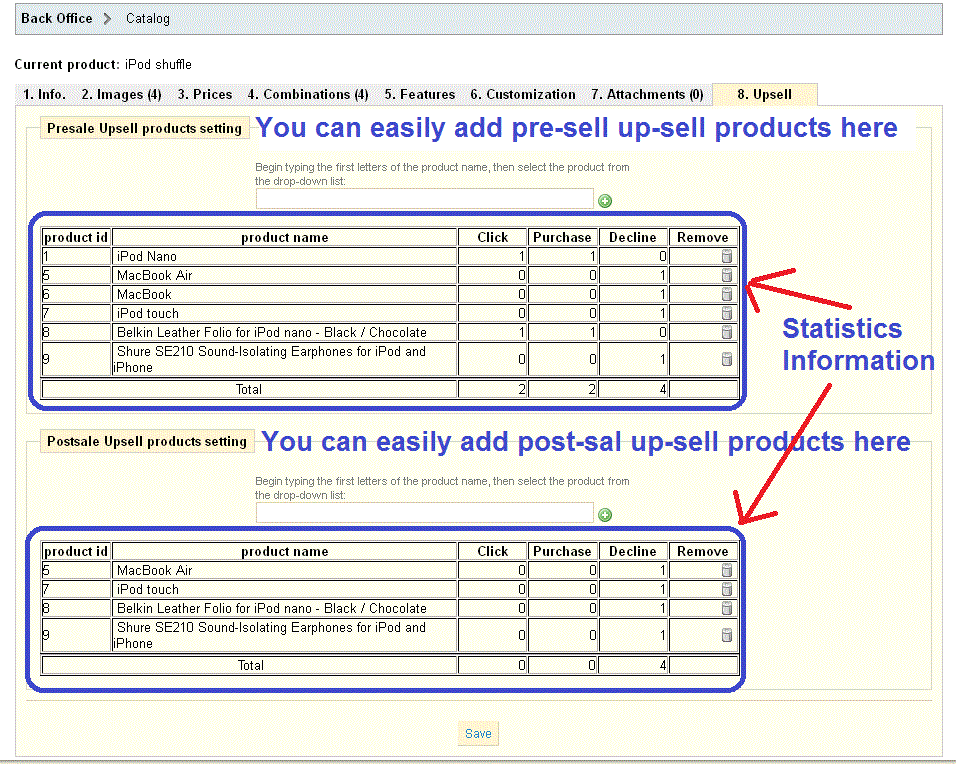
2.A new setting tab "Up-sell" is added to your PrestaShop back office product detail setting pages.


3.You are easily to input up-sell/cross-sell products by autocomplete search box. It is quick fast setting to save your maintenance time


4.You can set p-sell/cross-sell for specific related product, i.e. up-sell/cross-sell products are associated specific product.


5.You are able to collect following the promotional statistics information for your marketing promotion analysis.


Number of purchase - customers finally purchase the your up-sell/cross products
Number of clicks - customers showed interests to purchase your up-sell/cross-sell products
Number of refusal - customer does not show any interests of your up-sell/cross-sell products

6.The presale up-sell/cross-sell product will be pushed out at product detailed page while customer tries to purchase a product. See below screenshots.

7.The post-sale up-sell/cross-sell products will pushed out on carrier/shipping selection page during checkout process.


Back office:
1.At back end office, pre-upsell and post-upsell are defined for each product in an Upsell tab in the product section.

2.For each defined pre-upsell/post-upsell product, the statistics of the number times of clicks, number of people who purchase the products, and number of people who declines the product can be monitored.


Front office:
1.The pre-upsell happens just after a product is chosen. When the customer selects one product and enter the product page, the pre-upsell products will show below the main product's image. The customer can select any product to cart and continue shopping.

2.The post-upsell block shows the step "address" of the checkout process. It will show the pre-defined post-upsell products based on the products in the client's shopping cart. The client can add the selected post-upsell products to his/her cart.


Keywords/tags:
Up-sell, cross-sell, up-selling, cross-selling, pre-sale up-sell, post-sale upsell, PrestaShop up-sell module, PrestaShop cross-sell module, pre-sale up-selling, post-sale upselling, up-sell promotion, cross-sell promotions

You can buy this module at http://addons-modules.com/

PrestaShop Modules Info - Agile Product review modile version 1.1 released


One of our popular PrestaShop module - Agile Product reviews module has a new version 1.1.
The new version just released today, in this new version we have enable place holder function for rating summary in product list such Home Featured and Category or Search Result.

We have listened your voice and opinions on PrestaShop module - Agile Product reviews module.

Here are some voices we heard from our customer

1. I want change the position of product review/rating summary in product list page such Home Featured or Category. Because I don't like default position.

2. I am using 3rd party themes, because the 3rd party themes uses different CSS and tag, so the module can not find the default location to display the product reviews and ratings.

3. I am creating my own themes, I just want to customize the position of Product reviews ratings summary.

Now with the new version, it will solve all your issue.


About Agile Product reviews/ranting modules.
================================
Agile product Reviews module - it a PrestaShop module that allows your customer to leave reviews, comments and rate your products. It comes with a lot of more features compare with standard "Product Comments" module.

It increase the reliability of your product and attract more customer for you. It will also increase you site SEO ranking by keeping your home page updated frequently.

You can buy the module at http://addons-modules.com/

Saturday, October 1, 2011

PrestaShop Moudule Info - A new version of Agile Paypal Express Checkout module released

Good news to Agile Paypal users.
Agile Paypal 1.4 has been released today.
With this new version, following changes and improvements have been included.

Ver 1.4 (2011.10.01)
====================
1. Use Ajax way to update carriers/country/state at Express Checkout - no page refresh any more, quick and fast
2. Integrated Redirect/subscription page into main page with header/footer/left/right columns.
3. Use a animated image show the progress while redirecting to Paypal - looks more professional
The above change 1. may fix some potential issue caused by "Automatically redirect to Canonical url".


Agile Paypal is a PrestaShop payment module that use Paypal.

It is express checkout module, that allow customer to checkout in just a few clicks, no customer registeration is required, it's fast quick checkout. Pay by Master/Visa/American Express at Paypal without registeration. It automatically creates customer account by information from Paypal and many more other feartures.

It also supports Paypal recurring payments to give you more options to collect your sale money and many more other features.

See more detail, please visit
http://addons-modules.com/

Sunday, September 11, 2011

PrestaShop Module - Agile Seller Rating/Review/Comment module

We are proudly announce that Seller rating/review/comment module is not available.


What is it

It is a seller rating /comment module, is an accessory module of Agile Multiple Seller module. Buyer can feedback about seller by leaving comment and rating for the seller he/she buys product from.


Compatible Version It is compatible with PrestaShop 1.4x and any version of Agile Multiple Seller

This module only works together with Agile Multiple Seller module.

Features

only buyers can put rating/comment for sellers.

One order(transaction) one rating/comment only

There will a feedback waiting list for each buyer that list all orders/transactions for him/her to leave feedback.

At front office product detail page, there is Seller rating Summary info with 5 stars ratings

There is summary/average rating and rating/comment history for each seller

There are 3 predefined criteria: shipping, service, communication

You can add/modify/delete any number of criteria


Other Information

Install and configuration Video is available here
http://youtu.be/4d8G6_fV7E0

Demo Site
http://agileservex.com/prestashop142/
Contact us for admin access

Where to Buy
http://addons-modules.com/proeduct.php?id_product=35


Some of the screenshots


Seller Rating History/Summary


Buyer feedback waiting list/feedback form


Seller ranting summary at Product detail page

Agile Multiple Seller module installation and configuration vide is now available

A very good news for new PrestaShop owners who will use our Agile Multiple Seller/Vendor module, a install and configuration video now is available.


Below is the video script for your references.

Agile Multiple Seller Installation Guide

This video will demonstrate how to install and configure the Agile Multiple Seller module from Addons-Modules.com.

Installation

To get started with the installation, we are assuming you have the Agile Multiple Seller module on your local computer and that you are already logged into the PrestaShop Back Office.

Start by clicking on the Modules Tab.

Next, click "Add a module from my computer." This will expand a new section of the page called “Add a new module.”

Since the Agile Multiple Seller module is on your local computer, click the “Browse” button of the “Module file” input box.

This will bring up a new window where you can find the location of the Agile Multiple Seller module and choose that zipped folder. Then, click "Upload this module."

After the module is uploaded, go to the search bar and enter “Agile.” Select the Agile Multiple Seller module from the list. Prestashop will then take you to that module.

Now, you need to install the module by clicking the “Install” button.

 
After Installation

With the module installed, open your FTP program and connect to your Store’s files.

Copy the Category.php file from the following location:

YourStoreRoot/modules/agilemultipleseller/override/classes/Category.php

Now, paste that file into the following location:

YourStoreRoot/override/classes/Category.php

The next step is to verify that the Agile Multiple Seller Module automatically modified several core files. If the following files were not modified, for some reason, you will need to modify them manually, or the module will not work.

Check to be sure these three files have the modifications noted:
(The module installer has automatically taken care of this changes)

Modification #1:
• Affects: YourStoreRoot/admin/index.php
• Before following line:
o If ($id_tab = checkingTab($tab))
• Add following line
o If(Module::isInstalled('agilemultipleseller'))include(PS_ADMIN_DIR.'/../modules/agilemultipleseller/tabtranslator.php');
Modification #2:
• Affects: YourStoreRoot/admin/ajax_category_list.php
• Replace following line:
o If (Tools::getValue('token') != Tools::getAdminTokenLite('AdminCatalog'))
• With this line:
o If (Tools::getValue('token') != Tools::getAdminTokenLite('AdminCatalog') AND Tools::getValue('token') != Tools::getAdminToken('AdminCatalog'.(int)(Tab::getIdFromClassName('AgileCatalog')).(int)($cookie->id_employee)))
Modification #3:
• Affects: YourStoreRoot/admin/tabs/AdminCatalog.php
• Change the following two lines from "private" to "protected"
o private $adminCategories; becomes protected $adminCategories;
o private $adminProducts; becomes protected $adminProducts;

• Affects: YourStoreRoot/admin/tabs/AdminCMSContent.php
• Change the following two lines from "private" to "protected"
o private $adminCMSCategories; becomes protected $adminCMSCategories;
o private $adminCMS; becomes protected $adminCMS;
 
Configure the Module

With the module installed and the files verified, click the “Configure” hyperlink.

There are two sections on this page. The first being the “Settings” section and below that is the “Seller Profile Info” section.

Settings Section:

We’ll start with the “Settings” section. In this section, there are several choices to make. The first option asks you to choose whether the Store will collect all the money from a sale or if Sellers will collect money from the sale. For this example, we will choose “Store collects all payments.”

If you choose “Seller collects all payments,” you will need to be sure you are using a payment module that you have purchased from Addons-Modules.com due to the additional information that must be retrieved. If you use a payment module that was not created by Addons-Modules, the transaction will not be processed correctly, or at all.

Next, you’ll need to decide if you want to allow any Customer to become a Seller. Let’s click this check box.

If you choose not to click this check box, you can manually set up Sellers by adding them in the Employees Tab and then set their profile to “agilemultipleseller.”

The next option allows you to sign Customers up to a Seller’s account automatically. If you do not choose to sign Customers up automatically, but you did choose to allow Customers to become Sellers, the Customer can manually sign up for a Sellers account in their My Account area of the Front Office.

As noted in the previous option, you can manually set up Sellers by adding them in the Employees Tab and then set their profile to “agilemultipleseller.”

The next option allows you to choose whether or not your seller can create and edit categories. If you want them to be able to edit categories, check the box. For this example, we won’t check the box. That means that sellers can add products, but they cannot add nor edit categories.

The final selection se can make is the “Seller Info tab” check box. Here, you can choose to display a “Seller Info” tab in your Product Detail pages.

For instance, if you’ve checked the box and a customer views a Product Detail page in the Front office, a new tab will appear with the details the seller wants the customer to see such as their company name, address, and phone numbers. The seller can also display their location via a Google Map.

Lastly, if you made any changes, be sure you click the “Save” button.

Seller Profile Info Section:

The Seller Profile Info section points out that a new employee profile called “agilemultipleseller” was created when the module was installed.

You can view this new profile by going to the Employees tab and then the Profiles sub-tab.

You can change the permissions of the “agilemultipleseller” profile by going to the Employees tab, then the Permissions sub-tab. Then select the “agilemultipleseller” profile.

Please be sure you review the Maintenance Notes section as it contains important information to keep your module running smoothly.
 
Conclusion

That concludes this demonstration of how to install and configure the Agile Multiple Seller module.

Tuesday, August 9, 2011

PrestaShop addons - Free PrestaShop addon for duplicating/coping emails from PrestaShop

What does it do?
===============
After install this addon, it will send a copy of each emails of PrestaSho to shop owner. So as PrestaShop store, you will get a copy of every email sent from PrestaShop.

Note:
It does not guarantee that emails sent from 3rd party module will work.
Because 3rd party module may send emails though other mailling class, not Mail class of PrestaShop.


Features
The email was send separately, it is not a CC or BCC.
The email content is exactly the same as the one send to mail recipients.

Compatibility
This addon only works for PrestaShop 1.4x


Installation
Copy the file to following folder
YourStoreRoot/override/classes/

You are all set, just wait for email to be duplicated to you.


You Can download this add here
http://addons-modules.com/

Thursday, August 4, 2011

PrestaShop Modules - Agile paypal express checkout module 1.3 released now integrated into

We proudly to announce that the new version of Agile Paypal Express Checkout module 1.3 released today.

The new version of Agile Paypal Express Checkout module for PrestaShop 1.3x/1.4x, will bring you following new features

- Integrated to Agile Multiple Seller/Vendor modiule, make it possible for seller to collect sales.

By combine this module with Agile Multiple Seller/Vendor module, the sellers/vendors can collect their own sales (money).

- Recurring payment is also available when use normal checkout process (not in express checkout)

- When recurring payemt enabled, automatically show/hide recurring cycles based on user's selection of recurring or not.

- Hide express checkout screen, instead, it will show up a normal payment module when you using One Page Checkout.

- Some bug fixes and other improvements


Here is changed screen
1. Configuration screen changes


2. Normal checkout module screenshot


3. One page Checkout


================================================================
Agile Paypal Express checkout module is PrestaShop Paypal module that accept Paypal or major credit cards via Paypal. It can accept payment without customer registration. It also supports recurring payment, like monthly or yearly(any interval) subscription payment.

Agile Multiple Sellers/vendors module is a module that enable PrestaShop multiple seller function, allow customer or any one signup as seller to list and sell products.

For more information or purchase, please visit http://addons-modules.com/