Saturday, October 20, 2012

PrestaShop module - Agile market place modules for PrestaShop released


Today Agile team announced a new release market place module for PrestaShop 1.5x. Agile Multiple Sellers/Vendors module and its accessory modules are now compatible with PrestaShop.

Core module Agile Multiple Sellers/Vendors module and its accessory modules have been a great solution for PrestaShop based market places. It's been loved by many market place owners who running PrestaShop store. There are a variety of accessory modules to meet your different market place business requirements.

Agile Market Place solution modules  
All following modules are integrated with Agile Multiple Seller/vendor module, are all ready for PrestaShop 1.5x 


Agile Seller Commission - handling seller account commission/balance/history/payment
Agile Seller Products - provide seller's own page, URL like a mini shop
Agile Seller Messenger - Provide communication between buyer and seller via message
Agile Seller Review/rating - Provide buyer a chance to rate and feedback on sellers, seller respond
Agile Seller List Options - Provide store a chance to charge a fee for special list options
Agile Seller Shipping - Provide seller private shipping, product level shipping features

Payment module for Agile market place solution
You can use any PrestaShop compatible payment for Agile Market Place at store collect payments. Below are payment modules that support seller collects payment mode.

Agile Paypal Adaptive (Parallel/chained payment) - seller and store money concurrently
Agile Paypal express checkout  - support multiple payment seller collects payment
Agile Bank Wire - support multiple payment seller collects payment
Agile Pay By Cheque - support multiple payment seller collects payment
Agile Google Checkout  - support multiple payment seller collects payment

About PrestaShop Multi-store/multi-shop 

PrestaShop 1.5x provides functionality of multiple store and multiple shop, it is a great feature. But it also brings some complexity to store usability specially at back office. All modules are tested under one store/shop mode, it has not been confirmed under multi-store/shop mode.

We are still probing a better way to implement multi-shop(for multi-seller) functionality in PrestaShop 1.5x, we may or may not use original multi-shop/multi-store function. We will make the decision and provide necessary function as soon as we can.

For more information or purchase of the modules please visit http://addons-modules.com
You can also request live demo access thorough their product page. 


Saturday, August 18, 2012

PrestaShop Tips - PrestaShop 1.5 RC2 - An error occured during installation


Notice:

It seems the package I downloaded is not a completed one. Maybe the original files was not good.
I downloaded another package 2 days later. that one was working properly.
So if you encounter the same issue, I strongly suggest you to download the package again.


PrestaShop team released PrestaShop 1.5.0.15, also known as RC2(Release candidate 2). It is a good news because that means we will finally get the final release of PrestaShop 1.5 soon.

So I tried to install this version to make test. but there was a few issue when I tried to install this PrestaShop RC2. The first issue I encountered was that the package was corrupted, I guess there was some trouble on PrestaShop site, there are forum members reported the same issue. Fortunately the issue now has been fixed and we can download it now.

The issue

After I download the PrestaShop 1.5 RC package, and tried to install it, I chose all default selections and got following error when progress bar displayed 38%

  1. Create settings.inc file
  2. Create database tables
  3. Create default shop and languages
  4. Populate database tables

An error occured during installation...

You can use the links on the left column to go back to the previous steps, or restart the installation process by Click Here
There was no detailed information on what was wrong, so I tried to clear database and redo the installation, but got the same error.

So I have to spent close an hour to debug to find out the cause and fixed the issue.

Cause

The issue was caused by a missing file "image.inc.php" under root folder, it is used in /install/classes/xmlLoader.php as following


public function __construct()
{
$this->language = InstallLanguages::getInstance();
$this->setDefaultPath();
require_once _PS_ROOT_DIR_.'/images.inc.php';
}


Solution

The fix is very easy, just copy the missing file from previous version of PrestaShop and the error will be done. I got this file from PrestaShop RC1.

Hope this help others who are facing the same issue.

Notice:

It seems the package I downloaded is not a completed one. Maybe the original files was not good.
I downloaded another package 2 days later. that one was working properly.
So if you encounter the same issue, I strongly suggest you to download the package again.


Thursday, July 26, 2012

PrestaShop Module Info - Agile Seller/Vendor Shipping 1.1 released

Agile team today released a new version of Agile Seller/Vendor module 1.1. This is a accessory module of Agile Multiple Seller/Vendor module - a best PrestaShop based market solution.

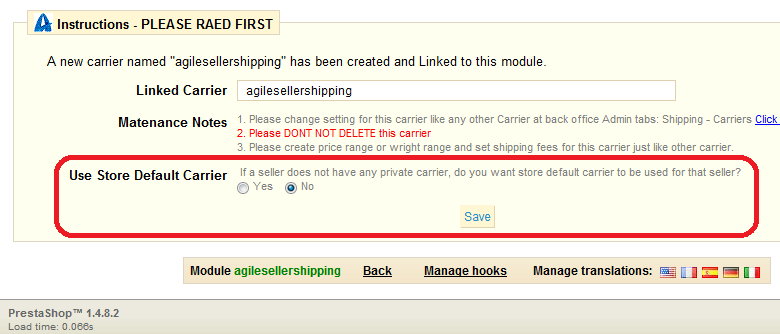
Agile Seller Shipping make it available for each seller has his/her private carriers and provider buyer at product level carrier selection features. The main change on this release 1.1 is to make it configurable for admin on how to use Store Default Carrier.


In previous version, the Store Default Carrier will be used for any seller that does not have any carrier available. In some store owner (market place owner), this might be not a good scenario.

Now admin can make decision on how to use default store carrier based on their business and situation.

Use Store Default Carrier 
Option 1:  Yes - use store default carrier for seller when there is no private carrier available .


If all sellers will use same shipping carrier and shipping fee rules, then you can use Option 1, so that all sellers do not need to set a private carriers. (There are quite a few market place owners choose this option)


Option 2:  No - Do not use store default carrier for seller when there is no private carrier available .


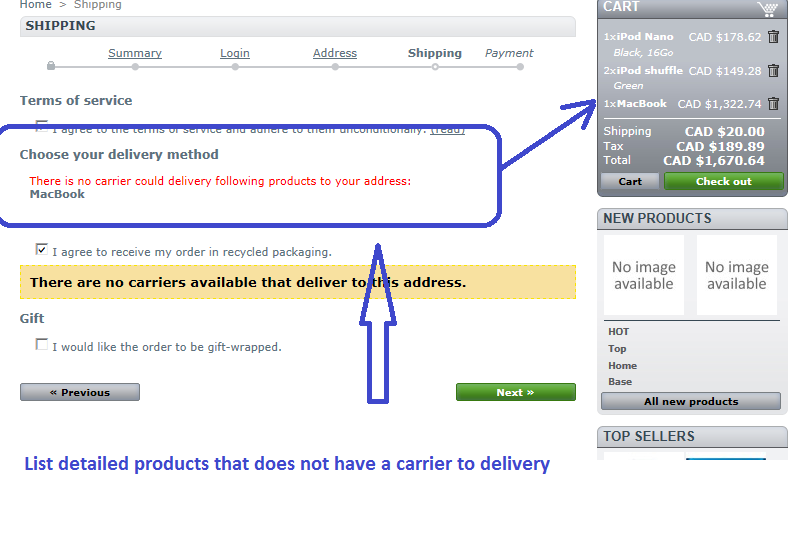
If most of the sellers have different carrier and different shipping fee rules. And you also want prevent buyer to purchase any product that does not delivery to a specific zone/region, then you can choose Option 2.
In this case, all sellers must set at least one carrier.


For more details on Agile Seller Shipping modules, please visit product page here

For more details on Agile Multiple Seller/Vendor module, please visit the product page here 

For other accessory modules for your PrestaShop based online market place solution, please visit http://addons-modules.com, most modules have live demo site for you to verify the functions and features by yourself.


Saturday, June 2, 2012

PrestaShop Module - Agile Multiple Seller/Vendor module 1.4.2.0 released

Today, Agile team released a new version of Agile Multiple Seller module 1.4.2.0. With this new version, there are many new long waited new features and improvement are included.

1.4.2.0 - 2012.06.02 - new features and improvement highlights- Changed to use company name as display seller name at back office
- Configurable to enable/disable category browsing and show all products in one place for seller  
- Configurable to display seller name on product list pages(category/home featured/search result)
  need to add one line line related to theme files
- Seller invoice -  display Seller Logo/Name/Address on PDF invoice file  and order confirmation email address 
- Split shopping cart into multiple orders if the cart contains products from multiple sellers. One order per seller.
-The installer will copy all override file automatically. Back up original file it is necessary.
- New tab under Order tab, to show list of products ordered, each seller can see their own products


About Cart/Order splitting
From version 1.4.2.0, the module is able to split one shopping cart into multiple order.  If customer has purchase products from multiple sellers, then the module will split the shopping cart/order into multiple ones. Each seller will have one cart and on order. This happen when customer finished payment or confirmed the orders. By this function, one order is always contain product from single seller. But customer is still able to purchase products from multiple sellers.
This also make following functions possible.

- Seller can manage the order status without affect other sellers.
- Show seller logo/name/address in PDF invoice
- Show seller logo/name/address in Order confirmation email
 (All thos functions are available in this core module)

About Seller Invoice
From version 1.4.2.0, the order invoice can have seller's logo, seller name, seller address in the PDF invoice. It is also possible to include seller name, seller logo, seller address in order confirmation email. Both are configurable to be easily to set on or off.

In order to include seller name, logo, seller address in order confirmation email, you need to add following keyword into order confirmation email templates.
{seller_name}
{seller_logo}
{seller_address}


About Agile Multiple Seller/Vendor module - It is a PrestaShop based market palace module provide a solution to create your own market place like eBay and Amazon. There are variety of accessory modules make it flexible and meet your different business requirements and business needs. See the module product description page for other features and more detailed latest information here.

Monday, May 21, 2012

PrestaShop moudle info - Agile PrestaShop seller shipping module

Agile Seller Shipping module is released to day. With this new accessory module, sellers/vendors are able to set their own shipping carrier and shipping fee based on price/weight, zone or region. Buyer/customers are able to select carriers at product item level at shopping cart based on available carriers the seller provides.


Features
- Store can set a standard shipping charges - which can be used for all sellers if the seller does not have private carriers
- If a seller does not have valid shipping carrier available, then the store standard shipping carrier will be applied

- Seller can have multiple private shipping carriers
- Seller can set default carrier so it will be selected by default for customer
- Seller can set different shipping charge (shipping fee) based on product price or product weight
- Seller can set different shipping charge (shipping fee) for different zone(region/country)


Orders and checkout
- Buyer Is able to choose carrier at product level
- The shipping price is updated dynamically when buyer change the shipping carrier for each product during checkout process
- Store admin can see detailed shipping from different carriers
- The module support both 5 steps traditional checkout process or Once Page Checkout process
- Seller can see detailed shipping information for different carriers on Order Details page at back office

Customer select carrier for each product item in shopping cart


Carrier management- carrier List


Carrier Management - Carrier details

Shipping Carrier information at Order detaeils pag


Saturday, May 5, 2012

PrestaShop Module Info - Agile PrestaShop Seller Messenger module

A long waited customer and seller communication tool - Agile PrestaShop Seller Messenger module is released from Agile team today. This module is an accessory module of Agile PrestaShop Multiple Seller/Vendor module - a best solution of PrestaShop based market place.

This module provide a communication tool between customers or potential customer and sellers. Customer can post questions at PrestaShop front store product detail page. And all questions and answers related to the product are also listed in the product page for as reference information for new customers.


PrestaShop Front store

1. A new message on product page (product footer-before long description) will displayed as following
Got a question? Click [Seller Q&A] tab below to ask seller a question.
You can change the message by PrestaShop translation function at back office


2. A new tab "Seller Q&A" at product page on PrestaShop front store
- A question/contact form for (potential) customer to post new questions
- See other questions that have been asked by other customers and answered by seller
- The new question message posted by customer will be show up on the same tab immediately
- The new question message will be sent to seller by email to notify seller about new questions
- The Question and Answers list has pagination functions when message increased


PrestaShop Back office

A new tab "Seller Questions" is added under "Customers" tab
- Sellers and Admin can see the messages
- Seller and admin can see the messages reply the message
- Both customers message and seller reply message will be displayed on product page
- Each seller can only see/reply messages the belong to his/her products


Module configuration
=====================
- You configure whether customers are required to log in before they can ask questions
- To avoid spam, you can configure to "Use Capcha" or not.
- You configure to copy the email messages to store admin  or not.


For more information, please visit here http://addons-modules.com/
http://addons-modules.com/en/49-agile-prestashop-seller-messenger-10.html

To experience live demo (with admin access, request at above product page), Please visit here


Saturday, April 28, 2012

PrestaShop Module info - Agile PrestaShop Seller commission - Shipping/Voucher handling

Agile Team released a new version of Agile Seller Commission module for PrestaShop market place solution.

Agile Seller commission module is an accessory of Agile Multiple Seller.market place module. It facilitate a flexible commission structure with base transaction fee and insertion fee. You can set the commission at store level or seller level. It maintain the account transaction history and account balance. And you can perform payments between sellers and store via Paypal without additional modules.
At this new release, the following features are added


- Configurable voucher cost and sharing feature
The seller commission module now support orders with vouchers with following conditions:
1. All vouchers can only be issues by store owner.
2. All vouchers used at purchase/order by customer will be shared by sellers with the percentage of products amount in the order.
3. You can configure the cost of voucher in following two ways

A. Voucher at cost of sellers - the cost of voucher will be deducted from seller sales for each order.  For example, if the seller have $100 product purchase and customer used $10 voucher discount. Then the final sale of the seller is $90.

B. Voucher at the cost of store owner  - sellers will have original sales before voucher is applied. For example, if the seller have $100 product purchase and customer used $10 voucher discount. Then the final sale of the seller is still $100. The $10 will be at store's cost.

- Configurable shipping fee inclusion or exclusion at insertion calculation
Now it is configurable to include or exclude of commission/insertion fee calculation.
Based on your business model and policy, you can decide to include shipping fee or exclude shipping for the insertion fee (seller commission)

For more information about Agile Seller Commission module, please click here
For more information about Agile Multiple Seller, please visit here

Live demo are also available, you can request demo access(including admin) at above product pages.