Saturday, March 24, 2012

PrestaShop module - Agile PrestaShop Showcase module 1.0 released

addons-modules.com has released a new module - Agile PrestaShop showcase manager module. This module will help PrestaShop owner to promote their online store and your business by displaying showcases.

Agile Prestashop Showcases manager module

Main features
- Customer can list or submit his business or website as showcase at your online PrestaShop store, as long as they have purchased your products or service from you PrestaShop store.
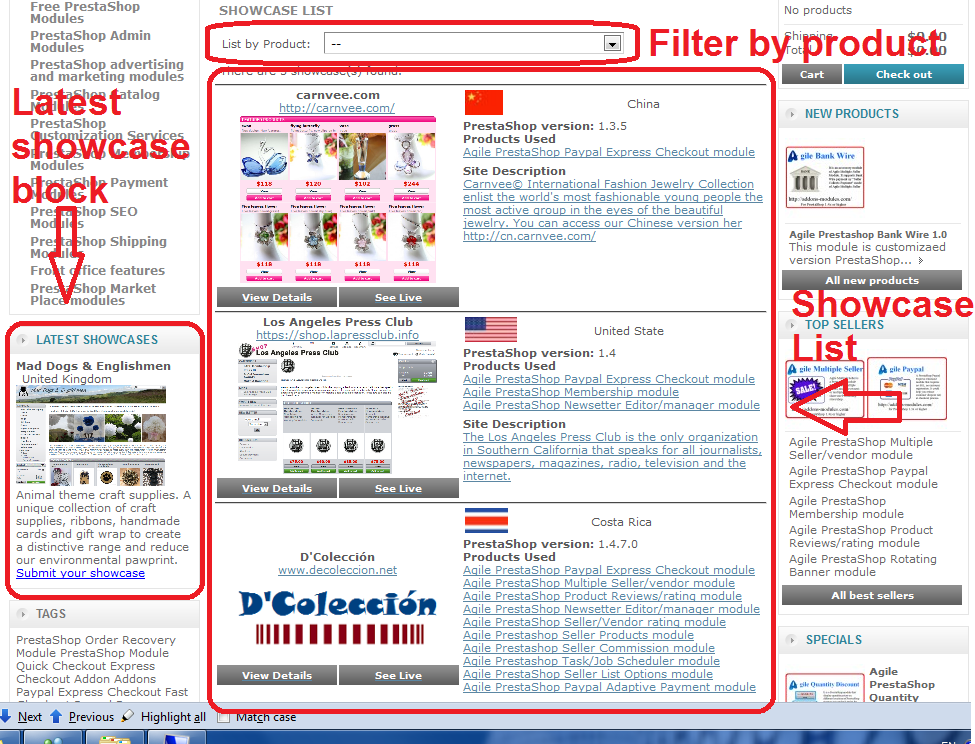
- There will be latest showcase block to display on left column or right column based on your configuration of the Agile PrestaShop showcases manager module.
- There is a showcase list will list all showcase submitted with brief information
- The showcases list can be easily filtered out by products or services that provided at your Prestashop store.
- Each showcase will need admin to approve it  before it will be appear on front store.
- You can set a limit the number of showcases to be submitted by one customer to prevent spam.
- There is also a capcha to verify customer input to prevent spam post of showcases
- Admin is able to modify each field data of each the showcase at back office admin tab
- The following information is included in the showcase

site name/business
website url
website screen image
country/region (display with a flag and name
description of site/business
products or services used (multiple selection)
comment/reviews about the products used
 
For more information, please visit the product page - Agile PrestaShop Showcase Manager
You can see live demo and purchase this module at http://addons-module.com/

Here are some screenshots
Showcase submit form


Showcase detailed

Showcase details at back office

Showcase approval and list at back office

Showcase list and latest showcase block

Saturday, March 10, 2012

PrestaShop Tips - Order date is empty at back office with error - Undefined index: date_format_full

If you have installed the latest version of PrestaShop 1.4.7, you may encounter following issue.

Symptom
1. At back office Orders tab you will find the order date are empty in the list
2. At order details page, all date fields are left as empty
3. If you set "display_errors" to "on" in /config/config.inc.php, you will find following errors

Notice: Undefined index: date_format_full in ....\www\prestashop\christophe\classes\Tools.php on line 495


Cause
If this issue happened at your store, it indicated that your store was not installed correctly. Some data fields in database are missed. See below highlighted in red.


How to fix the problem?
In order to fix this problem you will need to add those missing field to database.

You can run following scripts to fix the issue.

ALTER TABLE `ps_lang` ADD `date_format_lite` char(32) NOT NULL DEFAULT 'Y-m-d' AFTER language_code;
ALTER TABLE `ps_lang` ADD `date_format_full` char(32) NOT NULL DEFAULT 'Y-m-d H:i:s' AFTER date_format_lite;
UPDATE `ps_lang` SET `date_format_lite` = 'd/m/Y' WHERE `iso_code` IN ('fr', 'es', 'it');
UPDATE `ps_lang` SET `date_format_full` = 'd/m/Y H:i:s' WHERE `iso_code` IN ('fr', 'es', 'it');
UPDATE `ps_lang` SET `date_format_lite` = 'd.m.Y' WHERE `iso_code` = 'de';
UPDATE `ps_lang` SET `date_format_full` = 'd.m.Y H:i:s' WHERE `iso_code` = 'de';
UPDATE `ps_lang` SET `date_format_lite` = 'm/d/Y' WHERE `iso_code` = 'en';
UPDATE `ps_lang` SET `date_format_full` = 'm/d/Y H:i:s' WHERE `iso_code`= 'en';

After you run the script. the problem should be fixed.

Saturday, February 25, 2012

Paypal - How to get Paypal API credential from your Paypal account

This post is for purpose of providing a basic information to Paypal account owner to get API credential from Paypal account.

If you are Paypal account owner and want use your Paypal account for collecting payments for your online business, you can choose a variety of ways to do that. But some Paypal payment gateways requires API credential. It depends the what API the gateway is using.

Instructions on how to get your Paypal API credential


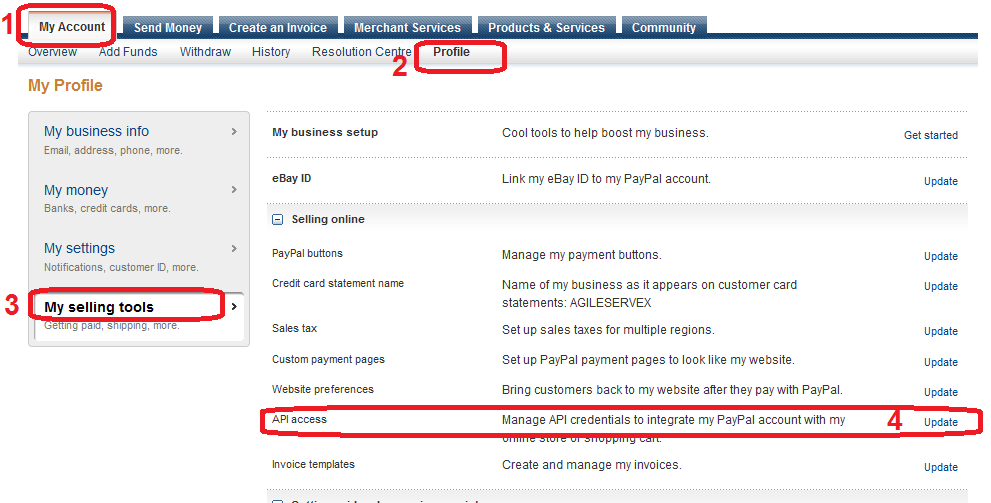
1. Log in to your Paypal account.
2. Click "My Account" tab menu
3. Click "My Profile" tab menu
4. Click "My selling tools" hyper link on left menu panel
5. Click "apply API signature" or "view API signature"


One you click "Apply API signature" or "Vew API signature", Paypal will assign a set of API credidential for you and it will be displayed on the screen. It contains following 3 items

API username - it is a email address

API password

API Signature


Please note:
Not all payment module requires API.

Agile PrestaShop Paypal Express Checkout module - does not require API credential. It is module provides a fast/quick checkout process for PrestaShop. Customer can finish checkout in just a few clicks because it does not required customer to register at PrestaShop for purpose. The best feature for store owner is that it could reduce customer dropout rate during checkout process. The module will register customer with accurate information from Paypal after payment is finished.

For more information about Agile PrestaShop Paypal Express Checkout module, please visit here.

Agile PrestaShop Paypal Adaptive Payment module - requires API credential
This module implemented Paypal Adaptive API that allows you process multiple payments in one big transactions. This module is an accessory module of Agile PrestaShop multiple sellers module - a best solution for PrestaShop based market place/multiple sellers store.

For more information about Paypal Adaptive payment, please visit here

For more information about Agile PrestaShop Multiple Seller module please visit here

General information about Paypal adaptive payment

What is Paypal adaptive payment
Paypal provide a very flexible and useful payment methods handle multiple payments in one big transaction. Mass payment is one of those payment methods. But I am trying to introduce is adaptive payment method.

The Adaptive Payments API enables you to send money in many different scenarios, from simple to complex. For example, you might build a small send money application for a social networking site or a robust payroll system. Another good example is if you are a market places owner(or a multiple sellers/vendors store owner), you may need to manually pay sellers sales later if you collect all payments, or seller need manually to pay you commissions(transactions fees) per month if let seller collects payment.

By using Paypal adaptive payment method, you will be able to let customer (buyer) to you and sellers at the same time in one big transaction.

For more detailed information on Paypal Adaptive Payment API, please visit here

Available payment options
Paypal adaptive payment allow following different payment options

1. Simple payment
This is just a normal payment method that happens in 1-1 payment. For example, your customer pays store for purchasing products from your store. Or you (the store) pay a seller commissions.


2. Parallel payment
This payment method, allow 1-n payments, i.e. buyer(sender) pay to multiple receivers.

For example, a customer purchaser at your market place purchase some products from seller A $15 and seller B $60 total $75. You as store(market place) owner will keep $5 from Seller A and $10 from seller B. The final payment will be

Customer pays $75 in total in one big transaction, it will goes
-> Seller A :$10
-> Seller B: $50
-> Store(Market Place): $15


3. Chained Payments

Use the same scenario above, but we use different way of payment. This time we use Paypal Adaptive chained payment.


For example, a customer purchaser at your market place purchase some products from seller A $15 and seller B $60 total $75. You as store(market place) owner will keep $5 from Seller A and $10 from seller B. The final payment will be

Customer pays store(market place) at $75
Store(market place) pays Seller A $10
Store(market place) pays Seller B $50


Choice of payment option
When it comes to the choice of payment options, it really depends on your business needs and how you want customer sees the payments.

Simple payments, it is simple and easy to implement. But in case you are running market place or multiple sellers store, you will need to handle the commissions manually later. For this payment option, you can use any other payment method availble from Paypal, you don not need to use Paypal Adaptive payments.

If you want customer to see payments goes to sellers, then you can choose parallel payments.
If you want hide sellers from customer, then you have to choose chained payments.

But there is one thing you need to consider:
Chained payment method is considered as advanced service of Paypal, you will need to get approved from Paypal before you can use it. If you use simple payment or parallel payment, then you don not need get approved from paypal.

What you need to do
In order to use Paypal Adaptive Payment API, you will need
1. Get a API credential

Click here on how to get your API credential (No approval required)

2. Get an Application ID from Paypal for your payment module
You will get the Application ID instantly if you only use basic service
You will need to wait for 2 weeks or more to get Application ID because has to approve it

Click here for more detailed instructions on how to get your Application ID

If you are thinking of building your own market place (multiple sellers store)
Addons-Modules.com is the one of lead vendor of PrestaShop modules and addons. Agile PrestaShop Multiple Seller modules and its accessory modules will help you build your own market place (multiple seller store) based on PrestaShop. Agile PrestaShop multiple seller modules provide all features and functionality for you to build your dream market places.

Please visit here for more details on Agile PrestaShop Multiple Seller modules

Wednesday, February 15, 2012

PrestaShop Module Info - Agile PrestaShop Seller Listing Options module, charge sellers listing option fees

Agile team luanched a new module Agile PrestaShop seller listing options module. This module make it possible for PrestaShop owner to charge seller to list product for sell and with additional paid listing options.


What does this module do?
This module will allow the store owner to charge sellers for listing products on his/her PrestaShop.For example, List/Show at HOME, show as HOT, show on list TOP of the category. Seller has to pay the option fees first before the product and its options become in effect. Seller is able to pay the options fee at front store by using any available payment method.

This is accessory module of Agile PrestaShop multiple seller/vendor module which is the best solution to create your own market place based on PrestaShop.


Compatible PrestaShop Versions
This module together with Agile Multiple Seller/vendor module requires PrestaShop 1.4x or higher

Functionalities of PrestaShop affected by installing this mule.
Once this module is installed, the Home Featured module will be hijacked, only those product selected “show at HOME” and paid (if fee is not 0) will be listed on Home Featured product list.
At back office catalog, the HOME category will not be available to Sellers, because it will be available via product listing option – show as HOME.
At backoffice catalog product page, following listing options will be added to the product attribute at the right upper corner of the screen.


Features and how the options work:
  1. Basic list option must always be selected if there is any other option is selected.
  2. All list options must be paid before it become in effect.
  3. The option fees payment will go through front store checkout process, and a order will be placed when option fees payment is done.
  4. Seller is able to pay listing options fees to store owner by any payment method that is available at your PrestaShop.
  5. If price is set zero (0), then this option is free. It will become in effect as long as you select it and save it.
  6. Once the option is in effect, the option is disabled and seller it not able to change it until it expires.
  7. Once basic listing is expired, all other listing options will not be in effect even if those options are not expired because they added later than basic listing.
  8. The listing duration (expiration) is configurable at modules screen by days, weeks, months or year.
  9. Seller is able to disable the product by status (active/inactive) even when the listing options are still in effect.
  10. The product choose to show on top will be choose randomly for fairness of sellers. Those products do not choose “shop on TOP” will be listed after those “show on TOP”.
If the option price is not set, it will be implicitly applied as 0 (free)


Where to buy
You can see more detailed and latest information of this module and reltaed module at
http://addons-modules.com/


Sunday, January 22, 2012

PrestaShop module info - Agile product review module has a new feature - Voting Reviews

Based on customers request, a few new features have been added to Agile Product review module.

- Voting on reviews : customer is able to cast a vote on reviews weather it is helpful or not
- Request review emails - send email to customers who placed order x days ago, the email will be send out automatically.

Voting on reviews
The "Voting on review" new feature allows customer/end users to vote on the reviews left by others customer to express his/her opinion on the reviews. For example, the customer can vote the review he is reading as "Like" it or "Dislike it", or "Helpful" or "Not helpful".

Also the poll/voting result will be displayed on the top of each review, this will be very good reference information for other customer.


Request review email
The module will send email to customer who made order x days ago. Ask customer to write a review/rating on the products that he/she purchased.

The email will automatically include the links the product pages so that customer can leave reviews. It is configurable on how many days the review request email should be sent after the date the order is received.

What is Agile product review?
Agile product review is one of best and most popular product review modules with many powerful and useful features. Such as Latest review on home page, language sensitive reviews displaying, different level of review criterion settings and and many more.

It has been installed on many PrestaShops.


You can find detailed information about Agile Product reviews module or purchase this module at http://addons-modules.com/

Interested in live demo?
If you would like to experience live demo of Agile product review module, you can visit here.

Friday, January 20, 2012

PrestaShop Tips - Online document of PrestaShop 1.4x

Most people don't know that PrestaShop has an official online document. Thanks PrestaShop team provide such a good and helpful online documents.


English version of online document PrestaShop 1.4x

http://doc.prestashop.com/display/PS14/English+documentation


If you would like a PDF version of the documents, you download it here


French version of of online document PrestaShop 1.4x
http://doc.prestashop.com/pages/viewpage.action?pageId=2424836

if you are looking for User's Guide for PrestaShop 1.3x, please download PDF document here
http://www.prestashop.com/download/Userguide_en.pdf