Most developers or prewstaShop owners want to download an old version of PrestaShop for testing or some other reason, but they don't know where they can get it. I myself actually have to Google to find out every time.
For myself also for others reference, here is the link that you can find all old version of PrestaShop.
http://code.google.com/p/prestashop/downloads/list
Tuesday, April 19, 2011


Friday, April 15, 2011
PrestaShop Tips - Ver 1.4 product referece number not show up in catalog mode
In PrestaShop 1.4, there is a very good new feature "Catalog Mode".
By using this feature you can use PrestaShop as catalog website that just introduce product information, no online shopping functionality. If you are looking for a catalog management website, it is also very good recommendation.
But there there is on small issue when you use "catalog mode", some time the small issue is very critical.
The problem:
============
The reference no of product will not show up if your product does not have a combination attributes.
Because reference no is only displayed in attribute combination box.
So if your product does not have attribute combination, the reference no will not show.
Solution
=========
The solution is very easy.
What you have to do is move the reference no displaying line to the top on short description box.
After following lines
Add following line
How to set Catalog Mode
=======================
1. log in to back office
2. Click Preference tab
3. Click Products sub tab
4. Choose Yes to "Catalog Mode"
5. click Save
By using this feature you can use PrestaShop as catalog website that just introduce product information, no online shopping functionality. If you are looking for a catalog management website, it is also very good recommendation.
But there there is on small issue when you use "catalog mode", some time the small issue is very critical.
The problem:
============
The reference no of product will not show up if your product does not have a combination attributes.
Because reference no is only displayed in attribute combination box.
So if your product does not have attribute combination, the reference no will not show.
Solution
=========
The solution is very easy.
What you have to do is move the reference no displaying line to the top on short description box.
After following lines
 <div id="pb-left-column">
  {if $product->description_short OR $packItems|@count > 0}
  <div id="short_description_block">
Add following line
<p id="product_reference" if="" or="">reference}style="display: none;"{/if}><label for="product_reference">{l s='Reference :'} </label><span class="editable">{$product->reference|escape:'htmlall':'UTF-8'}</span></p>
How to set Catalog Mode
=======================
1. log in to back office
2. Click Preference tab
3. Click Products sub tab
4. Choose Yes to "Catalog Mode"
5. click Save
PrestaShop Tips - Web Serivce function in ver 1.4
If you are an owner of PrestaShop 1.4, you may or may not noticed that in this new version, it provider web service functionality. This is one of the new features PrestaShop 1.4
What is "Web Service" of PrestaShop?
==================================
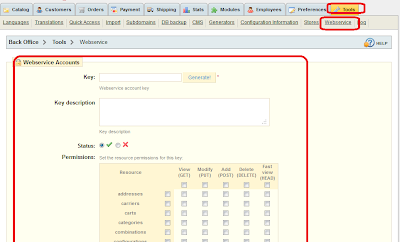
PrestaShop's Webservice allow third-party applications to accessing resources of PrestaShop : orders, products, address,countries,customers, etc...
Like the front-office and the back-office, the Webservice is a way for managing data of your shop.
When do you need to use WebService
==================================
This tab must be used only in the case of using a third-party application (web or software) or by a developer.
For example, if you want manage your PrestaShop data from other website. Or you want to retrieve data from PrestaShop to use for other web site. You can use this web service feature.
How to configure?
=================
At back office, Tools - Web service tab
Click a new to create a new web service.
1. Set or generate key
2. Set sttaus
3. Set description
4. Set data access permission of the web service
Click save
For more information, please visit
http://wiki.prestashop.com/display/enEN/Tutorial+Webservice+CRUD
What is "Web Service" of PrestaShop?
==================================
PrestaShop's Webservice allow third-party applications to accessing resources of PrestaShop : orders, products, address,countries,customers, etc...
Like the front-office and the back-office, the Webservice is a way for managing data of your shop.

When do you need to use WebService
==================================
This tab must be used only in the case of using a third-party application (web or software) or by a developer.
For example, if you want manage your PrestaShop data from other website. Or you want to retrieve data from PrestaShop to use for other web site. You can use this web service feature.
How to configure?
=================
At back office, Tools - Web service tab
Click a new to create a new web service.
1. Set or generate key
2. Set sttaus
3. Set description
4. Set data access permission of the web service
Click save
For more information, please visit
http://wiki.prestashop.com/display/enEN/Tutorial+Webservice+CRUD
Wednesday, April 6, 2011
PrestaShop Tips - Paypal recurring payment and Agile Paypal
Paypal Recurring Payment
========================
When you use PayPal Subscriptions and Recurring Payments, your customers can purchase automatically recurring subscriptions from your website.
Subscriptions and Recurring Payments is a low-cost way for you to accept credit card and bank account payments for content site subscriptions, newsletter fees, club dues, or recurring donations, and can be fully integrated with your website in a few easy steps. Subscriptions and Recurring Payments is only available for Business or Premier accounts.
Benefits of Recurring Payments
==============================
Save time and money with PayPal's hassle-free Subscriptions and Recurring Payments:
* Easy to implement - flexible and automatic billing frees you from sending invoices
* No up-front costs - you'll have the same low fee schedule used when you receive other PayPal payments
* Sell with ease - PayPal maintains detailed transaction records on our website
* Improve buyer experience - with customizable buttons and secure payments, happy customers become repeat customers
Agile Paypal and Recurring Payment
==================================
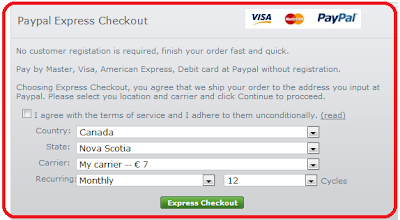
Agile Paypal is a PrestaShop Paypal Express Checkout module, the latest version Agile Paypal 1.2 added a new feature : Paypal Recurring Payment.
* Store owner is able t configure recurring cycle by choose daily/weekly/monthly/yearly or choose all of them.
* Customer is able to choose the number of cycles to subscribe. Or by default with limit of cycles until canceled by payer (customer) or recipient (store owner).
This module has many other features such as
* Pay major credit (Master, Visa, American Express) or event debit cards
* Does not require SSL (HTTPS)
* Does not requires user registration at PrestaShop store
* Easy to install and configure. You don’t have to change any file by default.
* Avoid address configuration errors because of no “state”.- And many more
* Many more
More Info
=======
You can find more information and customer's reviews at following thread in PrestaShop forum.
http://www.prestashop.com/forums/viewthread/77195/
You can buy this module at following location.
http://addons-modules.com/
========================
When you use PayPal Subscriptions and Recurring Payments, your customers can purchase automatically recurring subscriptions from your website.
Subscriptions and Recurring Payments is a low-cost way for you to accept credit card and bank account payments for content site subscriptions, newsletter fees, club dues, or recurring donations, and can be fully integrated with your website in a few easy steps. Subscriptions and Recurring Payments is only available for Business or Premier accounts.
Benefits of Recurring Payments
==============================
Save time and money with PayPal's hassle-free Subscriptions and Recurring Payments:
* Easy to implement - flexible and automatic billing frees you from sending invoices
* No up-front costs - you'll have the same low fee schedule used when you receive other PayPal payments
* Sell with ease - PayPal maintains detailed transaction records on our website
* Improve buyer experience - with customizable buttons and secure payments, happy customers become repeat customers
Agile Paypal and Recurring Payment
==================================

Agile Paypal is a PrestaShop Paypal Express Checkout module, the latest version Agile Paypal 1.2 added a new feature : Paypal Recurring Payment.
* Store owner is able t configure recurring cycle by choose daily/weekly/monthly/yearly or choose all of them.
* Customer is able to choose the number of cycles to subscribe. Or by default with limit of cycles until canceled by payer (customer) or recipient (store owner).
This module has many other features such as
* Pay major credit (Master, Visa, American Express) or event debit cards
* Does not require SSL (HTTPS)
* Does not requires user registration at PrestaShop store
* Easy to install and configure. You don’t have to change any file by default.
* Avoid address configuration errors because of no “state”.- And many more
* Many more
More Info
=======
You can find more information and customer's reviews at following thread in PrestaShop forum.
http://www.prestashop.com/forums/viewthread/77195/
You can buy this module at following location.
http://addons-modules.com/
Saturday, April 2, 2011
Prestashop Tips - Domain name and hostname is saved in DB
Most PrestaShop owners or potential owners do not realize a small change in PrestaShop 1.4. The domain name or the hostnbame now is saved in database ps_configuration table.
So if you are going move you store domain, please be caution of this changes.
In following cases, you will need to manually change the data saved in ps_configuration table.
1. If you setup your store locally, then move to real hosting site by backup and restore method.
2. If you are going to move your store domain from one to another in the same hosting server, but keep the database not changed.
3. if you are going to move your store to complete different server or hosting companay.
If you do not change domain name, when you access your new domain of your website, it will always be redirect to old domain website.
Pleaase following this to change your domain name
1. Use database admin tool like PhpMyAdmin (from your site control panel)
2. Locate table ps_configuration
3. Look for records with following name (by default they ID is 155/156)
* PS_SHOP_DOMAIN
* PS_SHOP_DOMAIN_SSL
4. Change the domain name to your new domain.
Please note: domain means domain name only, should not include the path.
for example, if your store URL is http://abcde.com/shop/, then only input "abcde.com"
the subfolder should be defined in file /config/setting.inc.php of you store.
Monday, March 14, 2011
[Module] - Agile pickup center - a PrestaShop shipping module for pickup location managements, linked to Google Maps
What it is
=======
* Agile Pickup Center is a PrestaShop module that faciliate the local pickup shipping carrier and management functions.
* It is a Google map linked module, it is a easy to install/configure and powerful pickup location management tools.
* See attached screen images and features listed below.

Admin Features
==========
* Automatically retrieve GEO (longitude, latitude) data at Pickup location admin page
* Able to set open date by weekdays for each pickup location.
* Able to set open time for different days
* Able to set location name for each pickup location
* Display pickup location on Order detailed page
User location selection features
============================
* Display available pickup locations on Google Map
* Display detailed information of selected pickup location with Info Window on Google Map
* Display distances between shipping address and pickup location
* Able to filter out by distance from Shipping address
* Able filter out pickup location by distance
Support version
=============
* PrestaShop ver1.3x and above
Where to buy
=========
* http://addons-modules.com/
Others
=======
* Welcome to leave your comment and advices or new requirements.
* We also accept customizations.
Other modules
=============
* Agile Paypal – PrestaShop Paypal Express Checkout module, no SSL, no customer registration, and many more * features.
* Agile Membership – a PrestaShop membership management module. Membership fee, membership expiration, member discount and many more features.
* Agile SEO Tag module – SEO enabled module, linked to PrestaShop friendly URL functionality.
* Other free modules – like Product sold counter, order recovery AdminCarts,…


=======
* Agile Pickup Center is a PrestaShop module that faciliate the local pickup shipping carrier and management functions.
* It is a Google map linked module, it is a easy to install/configure and powerful pickup location management tools.
* See attached screen images and features listed below.
Admin Features
==========
* Automatically retrieve GEO (longitude, latitude) data at Pickup location admin page
* Able to set open date by weekdays for each pickup location.
* Able to set open time for different days
* Able to set location name for each pickup location
* Display pickup location on Order detailed page
User location selection features
============================
* Display available pickup locations on Google Map
* Display detailed information of selected pickup location with Info Window on Google Map
* Display distances between shipping address and pickup location
* Able to filter out by distance from Shipping address
* Able filter out pickup location by distance
Support version
=============
* PrestaShop ver1.3x and above
Where to buy
=========
* http://addons-modules.com/
Others
=======
* Welcome to leave your comment and advices or new requirements.
* We also accept customizations.
Other modules
=============
* Agile Paypal – PrestaShop Paypal Express Checkout module, no SSL, no customer registration, and many more * features.
* Agile Membership – a PrestaShop membership management module. Membership fee, membership expiration, member discount and many more features.
* Agile SEO Tag module – SEO enabled module, linked to PrestaShop friendly URL functionality.
* Other free modules – like Product sold counter, order recovery AdminCarts,…
User order checkout - pick up location select

Admin page - location list

Admin pages, location detailed, automatically get GEO data from Google Maps

Selected Pickup location is displayed on order Detailed

Sunday, March 13, 2011
PrestaShop Tips - Paypal payment page header image issue
If you own Paypal business account, or what ever Paypal account you have, if you use to collect/receive payment, you are able to customize your Paypal payment page. Most Paypal acount owner know this and have already done so. Most important part is the header image of payment page.
Usually there are two way to set your Pyapl payment page header image.
1. You can set it at your Paypal account at Payal web site. For more detail, you can see my another blog here.
There is also a tricky way to have your https header image if you don't have https site. see my above blog link for detail.
2. You can set at your store site. For example at PrestaShop Paypal module screen, you able to set header image. it will overwrite the header image you set at your Paypal account.
This is very useful if you are using one Paypal account for multiple business/stores.
But at this moment, I found there is an issue when you use above 2nd option. It seems that there is a bug with Paypal side. Hope this issue could be fixed soon.
You can also find information at here: https://www.x.com/message/173062
Subscribe to:
Posts (Atom)